
6 Month Mentorship Program in Platform Engineering
From Basic to Advanced. Six specialized tracks, one topic a month — Linux & System Administration | Cloud Computing | DevOps & Python | Containers & Kubernetes | Infrastructure as Code | SRE, Observability & AI. Every track follows the same arc: Fundamentals → Hands-on Labs → Assignments → Mini Projects → Job Scenarios → Troubleshooting → Capstone → Mock Interviews, across 90+ labs, 60+ assignments, 25+ mini projects, 6 major capstones and 1 integrated enterprise capstone. No prior Linux administration experience is required — Month 1 starts at fundamentals and the programme finishes with SRE, AIOps and AI-assisted platform operations.
6 Month Mentorship Program in Platform Engineering
From Basic to Advanced | 6 Months | 6 Specialized Tracks
Tools you'll master
Enquire Now
Get course fees, batch dates & a callback
Why This Course?
Prerequisites
Programme Overview
6 specialized tracks, one topic a month — Linux & System Administration, Cloud Computing, DevOps & Python, Containers & Kubernetes, Infrastructure as Code, and SRE, Observability & AI. Each month ends in a major outcome, from Enterprise Linux Administrator through to SRE / Platform Engineer.
Month 1 — Linux & System Administration
Enterprise Linux administration with practical experience in users, permissions, networking, storage, processes, services, security, automation and troubleshooting. Outcome: Enterprise Linux Administrator.
Month 2 — Cloud Computing
Cloud infrastructure fundamentals through advanced deployment and administration using AWS, Azure and GCP concepts. Outcome: Cloud Infrastructure Engineer.
Month 3 — DevOps & Python
DevOps principles, Git, CI/CD, Python automation, Linux automation and deployment pipelines. Outcome: DevOps / Automation Engineer.
Month 4 — Containers & Kubernetes
Containerization using Docker and enterprise Kubernetes administration, deployment, networking, security and troubleshooting. Outcome: Container & Kubernetes Engineer.
Month 5 — Infrastructure as Code (IaC)
Automated infrastructure provisioning and configuration management using Terraform, Ansible and policy-driven infrastructure practices. Outcome: Infrastructure Automation Engineer.
Month 6 — SRE, Observability & AI
Site Reliability Engineering, production reliability, monitoring, observability, incident management, SLOs/SLIs and AI-assisted platform operations. Outcome: SRE / Platform Engineer.
Who is this programme for?
Whether you're a fresher, a Linux administrator, a Cloud Engineer, a developer or already working in production support — this mentorship is built to take you into a Platform Engineer, Cloud DevOps Engineer, Kubernetes Engineer, Infrastructure Automation Engineer or Site Reliability Engineer role.
Students & Freshers
No prior Linux administration experience needed — Month 1 starts at fundamentals and builds towards Junior Platform Engineer and Linux System Administrator roles.
Linux & System Administrators
Move up into Platform Engineer, Infrastructure Engineer and Cloud Operations Engineer roles with cloud, containers and IaC.
Cloud Engineers
Broaden into Cloud DevOps Engineer and Kubernetes Engineer roles across AWS, Azure and Google Cloud.
Developers & Scripters
Step into DevOps Engineer, Infrastructure Automation Engineer and Terraform Engineer roles through Git, Python and CI/CD.
Production Support Teams
Grow into Site Reliability Engineer and Production Support Engineer roles with SLOs, observability, incident response and RCA.
AI-Focused Engineers
Target DevSecOps, SRE / Observability Engineer and AIOps / Platform Automation Engineer roles with AI-assisted operations.
Course Curriculum
6 tracks • 32 modules • one topic a month, with labs, assignments and a capstone in every track
Enterprise Linux administration with practical experience in users, permissions, networking, storage, processes, services, security, automation and troubleshooting.
Course Content
Prerequisites:
- Basic computer knowledge
- Basic networking concepts
- No prior Linux administration experience required
- Logical and problem-solving skills
Topics:
- Linux architecture
- Kernel, shell and filesystem
- CLI vs GUI
- Linux distributions
- Boot process
- Filesystem hierarchy
- Users, groups and permissions
- Processes and services
- Basic networking
- System security fundamentals
Topics:
- RHEL / Rocky Linux / Ubuntu
- Installation and VM configuration
- Linux filesystem
- File and directory management
- Users and groups
- Permissions and ownership
- ACLs
- Sudo and privilege management
- Package management
- RPM / YUM / DNF / APT
- Processes and jobs
- Systemd and services
- Cron and scheduled jobs
- Environment variables
- Shell configuration
Topics:
- Disk management
- Partitions
- Filesystems
- Mounting
- /etc/fstab
- LVM
- RAID concepts
- Disk monitoring
- Storage troubleshooting
Topics:
- IP configuration
- DNS
- DHCP
- SSH
- SCP/SFTP
- Routing
- Network troubleshooting
- Firewall
- NetworkManager
Topics:
- SSH hardening
- Password policies
- Sudo security
- File permissions
- SELinux fundamentals
- Firewall configuration
- Security logs
- Audit concepts
- Patch management
Topics:
- Bash scripting
- System administration scripts
- Backup automation
- Log-management scripts
Labs:
- Linux Server Installation Lab
- Linux Filesystem Administration Lab
- User & Group Management Lab
- Linux Permissions & ACL Lab
- Sudo Security Lab
- Package Management Lab
- Process Management Lab
- Systemd Service Management Lab
- SSH Configuration & Hardening Lab
- Linux Networking Lab
- Firewall Configuration Lab
- LVM Storage Management Lab
- Linux Log Analysis Lab
- Bash Automation Lab
- Linux Server Hardening Lab
Assignments:
- Enterprise Linux installation
- User and group administration
- Permission management
- LVM configuration
- SSH hardening
- Firewall configuration
- Linux performance analysis
- Log investigation
- Server security checklist
- Bash administration automation
Mini Projects:
- Secure Linux Server Deployment
- Linux User & Access Management System
- Automated Linux Backup System
- Linux Server Monitoring Script
Project Focus:
- Students deploy multiple Linux servers and implement the full administration stack
Implemented
- › Users/groups
- › SSH
- › Networking
- › Firewall
- › Storage
- › Services
- › Monitoring
- › Security hardening
- › Backup
- › Automation
- › Troubleshooting documentation
Scenarios:
- Production server is running out of disk space
- SSH access is failing
- User cannot access required files
- Linux service has stopped
- Server CPU utilization is high
- DNS resolution is failing
- Unauthorized login detected
- Application cannot access a mounted filesystem
Troubleshooting:
- Boot failure
- Permission denied
- SSH connection failure
- DNS failure
- Service failure
- Disk full
- High CPU
- High memory
- Network interface failure
- LVM/storage issue
Tools:
- Linux
- RHEL
- Rocky Linux
- Ubuntu
- SSH
- Bash
- systemd
- LVM
- SELinux
- firewalld
- iptables/nftables
- Git
- Ansible
Best Practices:
- Least privilege
- Secure SSH
- Regular patching
- Centralized logging
- Strong access controls
- Backup and recovery
- Infrastructure documentation
- Monitoring and alerting
Mock Interviews
- › Linux commands
- › Troubleshooting
- › Networking
- › Permissions
- › Storage
- › SSH
- › systemd
- › Production scenarios
Certifications:
- Red Hat Certified System Administrator (RHCSA)
- CompTIA Linux+
- LPIC-1
- Red Hat Certified Engineer (RHCE)
Cloud infrastructure fundamentals through advanced deployment and administration using AWS, Azure and GCP concepts.
Course Content
Prerequisites:
- Linux fundamentals
- Networking fundamentals
- Basic virtualization concepts
Topics:
- Cloud computing
- IaaS / PaaS / SaaS
- Public/private/hybrid cloud
- Regions and availability zones
- Virtualization
- Cloud networking
- IAM
- Storage
- Compute
- High availability
- Scalability
- Shared responsibility model
Topics:
- AWS / Azure / GCP architecture
- Regions and Availability Zones
- Compute services
- Virtual machines
- Images and snapshots
- Instance lifecycle
- Auto Scaling
Topics:
- VPC / VNet
- Subnets
- Route tables
- Internet/NAT gateways
- Security Groups
- Network Security Groups
- Load Balancers
- DNS
- VPN
- Private connectivity
Topics:
- Users
- Groups
- Roles
- Policies
- RBAC
- MFA
- Least privilege
- Service identities
Topics:
- Object storage
- Block storage
- File storage
- Lifecycle policies
- Backup
- Encryption
Topics:
- Monitoring
- Logging
- Cost management
- Backup
- High availability
- Disaster recovery
- Cloud security
Labs:
- AWS Account & IAM Lab
- Azure Resource Management Lab
- Cloud VM Deployment Lab
- VPC/VNet Design Lab
- Cloud Subnet Lab
- Security Group/NSG Lab
- Load Balancer Lab
- Cloud Storage Lab
- IAM Role Lab
- Cloud Monitoring Lab
- Cloud Backup Lab
- Cloud DNS Lab
- Auto Scaling Lab
- Cloud Security Lab
- Highly Available Application Lab
Assignments:
- Cloud architecture design
- VPC/VNet design
- IAM policy creation
- Cloud security assessment
- Cloud storage architecture
- Load-balancing architecture
- Cloud monitoring plan
- High-availability design
- Cloud cost optimization exercise
Mini Projects:
- Secure AWS Web Infrastructure
- Azure Enterprise Network
- Highly Available Cloud Application
- Cloud Monitoring & Alerting System
Project Focus:
- Build a production-style cloud environment
Containing
- › VPC/VNet
- › Multiple subnets
- › Linux servers
- › IAM
- › Load balancer
- › Auto scaling
- › Storage
- › Monitoring
- › Backup
- › Security controls
- › High availability
Scenarios:
- Cloud VM is unreachable
- Application is unavailable
- Security group blocks traffic
- IAM user cannot access resource
- Public storage exposure
- High cloud infrastructure cost
- Load balancer health check failure
- Cloud server requires recovery
Troubleshooting:
- VPC/VNet connectivity
- Route-table problems
- Security-group issues
- DNS failures
- IAM access denied
- VM boot failure
- Load-balancer failure
- Storage access problems
Tools:
- AWS
- Microsoft Azure
- Google Cloud
- AWS CLI
- Azure CLI
- Cloud Shell
- CloudWatch
- Azure Monitor
- IAM
- Entra ID
- Terraform
Best Practices:
- Least privilege
- Infrastructure segmentation
- Multi-AZ design
- Encryption
- Automated backup
- Monitoring
- Cost optimization
- Infrastructure automation
Mock Interviews
- › Cloud architecture
- › VPC
- › IAM
- › Storage
- › Networking
- › HA
- › Troubleshooting
- › Cloud scenarios
Certifications:
- AWS Certified Solutions Architect – Associate
- Microsoft Azure Administrator Associate
- Google Associate Cloud Engineer
- AWS Certified Cloud Practitioner
DevOps principles, Git, CI/CD, Python automation, Linux automation and deployment pipelines.
Course Content
Prerequisites:
- Linux basics
- Basic cloud knowledge
- Basic programming logic
Topics:
- DevOps culture
- SDLC
- Agile
- CI/CD
- Version control
- Infrastructure automation
- Continuous testing
- Continuous deployment
- DevOps lifecycle
Topics:
- Git fundamentals
- Repository management
- Branching
- Merging
- Rebasing
- Pull requests
- Git workflows
- GitHub/GitLab
Topics:
- Pipeline architecture
- Jenkins
- GitHub Actions
- GitLab CI/CD
- Build automation
- Testing
- Artifact management
- Deployment strategies
- Rollback
Topics:
- Python fundamentals
- Variables
- Data types
- Conditions
- Loops
- Functions
- Modules
- Exception handling
- Files
- JSON/YAML
- APIs
- Requests
- Automation scripts
- SSH automation
- Cloud automation
Topics:
- Linux automation
- API automation
- Cloud automation
- Deployment automation
- Monitoring automation
Labs:
- Git Repository Lab
- Branching & Merge Lab
- GitHub Workflow Lab
- Jenkins Installation Lab
- Jenkins CI Pipeline
- GitHub Actions Pipeline
- Python Fundamentals Lab
- Python File Automation
- Python API Automation
- Python Linux Automation
- Cloud Automation with Python
- Automated Deployment Lab
- CI/CD Security Lab
- Pipeline Notification Lab
- Automated Rollback Lab
Assignments:
- Git branching strategy
- Git conflict resolution
- Jenkins pipeline
- GitHub Actions workflow
- Python automation script
- REST API automation
- Linux automation
- Cloud automation
- CI/CD pipeline design
Mini Projects:
- Python Server Automation Toolkit
- Automated Application Deployment
- Jenkins CI/CD Pipeline
- Cloud Infrastructure Automation Script
Project Flow:
- Git → Build → Test → Security Scan → Package → Deploy → Monitor → Rollback
Scenarios:
- Failed production deployment
- Git merge conflict
- Pipeline failure
- Build failure
- Deployment rollback
- API authentication failure
- Automated server provisioning
- Application deployment automation
Troubleshooting:
- Git conflicts
- Jenkins agent failure
- Pipeline failure
- Credentials failure
- Python dependency issue
- API timeout
- Deployment failure
- Rollback failure
Tools:
- Git
- GitHub
- GitLab
- Jenkins
- GitHub Actions
- Python
- PyCharm/VS Code
- Docker
- AWS CLI
- Azure CLI
- Ansible
Best Practices:
- Version control everything
- Automated testing
- Pipeline security
- Secrets management
- Code review
- Small deployments
- Automated rollback
- Infrastructure automation
Mock Interviews
- › Git
- › CI/CD
- › Jenkins
- › Python
- › Automation
- › Deployment
- › DevOps troubleshooting
Certifications:
- AWS Certified DevOps Engineer
- Microsoft DevOps Engineer Expert
- Certified Jenkins Engineer
- GitHub Foundations
- Python certifications
Containerization using Docker and enterprise Kubernetes administration, deployment, networking, security and troubleshooting.
Course Content
Prerequisites:
- Linux
- Networking
- Git
- Basic cloud knowledge
Topics:
- Containers
- Virtual machines vs containers
- Container architecture
- Docker architecture
- Kubernetes architecture
- Cluster components
- Pods
- Services
- Deployments
- Container networking
Topics:
- Docker architecture
- Images
- Containers
- Dockerfile
- Docker Compose
- Volumes
- Networks
- Registry
- Image optimization
- Container security
Topics:
- Control plane
- Worker nodes
- Pods
- ReplicaSets
- Deployments
- Services
- Namespaces
- ConfigMaps
- Secrets
- Volumes
- StatefulSets
- DaemonSets
- Jobs/CronJobs
- Ingress
Topics:
- Scheduling
- Resource limits
- HPA
- RBAC
- Network Policies
- Persistent Volumes
- Helm
- Rolling updates
- Blue/green deployments
- Cluster troubleshooting
- Kubernetes security
Labs:
- Docker Installation Lab
- Docker Image Lab
- Dockerfile Lab
- Docker Networking Lab
- Docker Volume Lab
- Docker Compose Lab
- Private Registry Lab
- Kubernetes Cluster Lab
- Pod Deployment Lab
- Kubernetes Service Lab
- ConfigMap & Secret Lab
- Persistent Storage Lab
- Ingress Lab
- RBAC Security Lab
- Kubernetes Troubleshooting Lab
Assignments:
- Build Docker image
- Optimize Dockerfile
- Docker Compose deployment
- Kubernetes deployment
- Kubernetes service
- ConfigMap/Secret
- Ingress configuration
- Persistent storage
- RBAC implementation
- Kubernetes troubleshooting
Mini Projects:
- Containerized Web Application
- Three-Tier Docker Application
- Kubernetes Microservices Platform
- Secure Kubernetes Cluster
Project Focus:
- Develop a production-style containerized platform end to end
Develop
- › Containerized applications
- › Kubernetes cluster
- › Microservices
- › Ingress
- › Load balancing
- › Secrets
- › Persistent storage
- › Autoscaling
- › RBAC
- › Monitoring
- › Security
Scenarios:
- Pod stuck in Pending
- Container continuously restarting
- Service unavailable
- Image pull failure
- Kubernetes node failure
- Ingress not working
- Application requires scaling
- Persistent volume unavailable
Troubleshooting:
- CrashLoopBackOff
- ImagePullBackOff
- Pending pods
- DNS issues
- Service connectivity
- Node NotReady
- Storage problems
- RBAC errors
Tools:
- Docker
- Docker Compose
- Kubernetes
- kubectl
- Helm
- Minikube
- Kind
- EKS
- AKS
- GKE
- Harbor
- Prometheus
- Grafana
Best Practices:
- Minimal images
- Image scanning
- Resource limits
- RBAC
- Network policies
- Secrets management
- Health probes
- Autoscaling
- Rolling deployments
- Cluster monitoring
Mock Interviews
- › Docker
- › Kubernetes
- › Pods
- › Services
- › Networking
- › Storage
- › RBAC
- › Troubleshooting
Certifications:
- Certified Kubernetes Administrator (CKA)
- Certified Kubernetes Application Developer (CKAD)
- Certified Kubernetes Security Specialist (CKS)
- Docker certifications
Automated infrastructure provisioning and configuration management using Terraform, Ansible and policy-driven infrastructure practices.
Course Content
Prerequisites:
- Linux
- Cloud fundamentals
- Git
- Basic networking
Topics:
- Infrastructure as Code
- Declarative vs imperative
- Configuration management
- Immutable infrastructure
- Infrastructure lifecycle
- State management
- Idempotency
- Infrastructure version control
Topics:
- Terraform architecture
- Providers
- Resources
- Variables
- Outputs
- Data sources
- Modules
- State
- Remote state
- Workspaces
- Backend
- Dependency management
- Terraform Cloud concepts
Topics:
- Reusable modules
- Environment management
- Multi-cloud IaC
- CI/CD integration
- Security scanning
- Policy as Code
Topics:
- Inventory
- YAML
- Playbooks
- Tasks
- Variables
- Roles
- Templates
- Handlers
- Vault
- Configuration management
Topics:
- Secrets
- Terraform security
- Misconfiguration detection
- Policy enforcement
- Drift detection
- Compliance automation
Labs:
- Terraform Installation Lab
- AWS Infrastructure Provisioning Lab
- Azure Infrastructure Provisioning Lab
- Terraform Variables Lab
- Terraform State Lab
- Remote Backend Lab
- Terraform Modules Lab
- Multi-Environment Lab
- Terraform CI/CD Lab
- Terraform Security Scanning Lab
- Ansible Installation Lab
- Ansible Inventory Lab
- Ansible Playbook Lab
- Ansible Roles Lab
- Automated Infrastructure Deployment Lab
Assignments:
- Terraform cloud infrastructure
- Terraform variables
- Remote state
- Terraform modules
- Multi-environment infrastructure
- Ansible server configuration
- Ansible roles
- Infrastructure security scan
- IaC CI/CD pipeline
- Infrastructure drift investigation
Mini Projects:
- AWS Infrastructure Using Terraform
- Azure Infrastructure Using Terraform
- Linux Configuration Using Ansible
- Multi-Environment IaC Platform
- Secure IaC Pipeline
Project Flow:
- Git → Terraform → Cloud Infrastructure → Ansible → Application Deployment → Security Scan → Monitoring
Scenarios:
- Terraform state conflict
- Infrastructure drift
- Failed provisioning
- Cloud resource dependency
- Ansible playbook failure
- Configuration inconsistency
- Secret exposed in code
- Infrastructure rollback
Troubleshooting:
- Terraform authentication failure
- State locking
- Provider error
- Dependency error
- Resource creation failure
- Ansible SSH failure
- YAML syntax error
- Permission issue
- Configuration drift
Tools:
- Terraform
- Terraform Cloud
- OpenTofu
- Ansible
- Git
- GitHub
- GitLab
- Jenkins
- AWS
- Azure
- GCP
- Checkov
- OPA
Best Practices:
- Version-controlled infrastructure
- Remote state
- Reusable modules
- Code review
- Secrets management
- Automated validation
- Policy as Code
- Drift detection
- Immutable infrastructure
Mock Interviews
- › Terraform
- › State
- › Modules
- › Ansible
- › IaC architecture
- › Automation
- › Troubleshooting
Certifications:
- HashiCorp Terraform Associate
- Red Hat Certified Specialist in Ansible Automation
- AWS Solutions Architect
- Azure Administrator
Site Reliability Engineering, production reliability, monitoring, observability, incident management, SLOs/SLIs and AI-assisted platform operations.
Course Content
Prerequisites:
- Linux
- Cloud
- DevOps
- Kubernetes
- Python fundamentals
Topics:
- SRE principles
- DevOps vs SRE
- Reliability engineering
- SLIs
- SLOs
- SLAs
- Error budgets
- Incident management
- Observability
- Monitoring vs observability
- Automation
- Toil reduction
Topics:
- SRE principles
- Service reliability
- SLIs/SLOs/SLAs
- Error budgets
- Availability
- Reliability
- Capacity planning
- Performance engineering
- Incident management
- Postmortems
- Disaster recovery
- Business continuity
Topics:
- Metrics
- Logs
- Traces
- Distributed tracing
- Application monitoring
- Infrastructure monitoring
- Kubernetes monitoring
- Alerting
- Dashboards
Topics:
- Prometheus
- Grafana
- Alertmanager
- ELK/OpenSearch
- OpenTelemetry
- Jaeger
Topics:
- Incident detection
- Triage
- Severity
- Escalation
- Incident response
- Root-cause analysis
- RCA documentation
- Postmortems
Topics:
- GenAI fundamentals for infrastructure
- AI-assisted troubleshooting
- Log analysis with AI
- Incident summarization
- AI-assisted RCA
- AIOps concepts
- Anomaly detection
- Predictive monitoring
- AI-assisted automation
- Intelligent alert correlation
- AI agents for platform operations
- Human approval and operational safety
Labs:
- SRE Fundamentals Lab
- SLI/SLO Design Lab
- Error Budget Lab
- Prometheus Installation Lab
- Grafana Dashboard Lab
- Alertmanager Lab
- Linux Monitoring Lab
- Kubernetes Monitoring Lab
- Centralized Logging Lab
- OpenTelemetry Lab
- Distributed Tracing Lab
- Incident Response Lab
- Root Cause Analysis Lab
- AI-Assisted Log Analysis Lab
- AI-Assisted Incident Investigation Lab
- AIOps Anomaly Detection Lab
- AI Platform Automation Lab
Assignments:
- Define SLIs and SLOs
- Design an SRE dashboard
- Create Prometheus alerts
- Grafana dashboard
- Incident-response plan
- Production RCA
- Capacity-planning exercise
- Error-budget calculation
- AI-assisted log investigation
- AIOps architecture design
Mini Projects:
- Enterprise Infrastructure Monitoring Platform
- Kubernetes Observability Platform
- Automated Incident Detection System
- AI-Assisted Log Analysis Platform
- SRE Reliability Dashboard
Project Flow:
- Infrastructure → Kubernetes → Metrics → Logs → Traces → Alerts → Incident → RCA → SLO
Project Flow:
- Monitoring → Alert → AI Analysis → Log Correlation → Root Cause Suggestions → Remediation Recommendation → Human Approval → Automation
Scenarios:
- Production application outage
- High CPU/memory
- Kubernetes pod failures
- Increased application latency
- API response degradation
- Database connection problems
- Alert storm
- Service-level objective breach
- Repeated production incidents
- AI-assisted incident investigation
Troubleshooting:
- Prometheus target unavailable
- Grafana dashboard missing metrics
- Alert not triggering
- High application latency
- Memory leak
- Kubernetes performance degradation
- Log ingestion failure
- Distributed trace missing
- Alert fatigue
- Incorrect AI-generated diagnosis
Tools:
- Prometheus
- Grafana
- Alertmanager
- ELK Stack
- OpenSearch
- Fluent Bit
- Loki
- OpenTelemetry
- Jaeger
- Kubernetes
- Datadog
- New Relic
- Splunk
- Python
- GenAI/AIOps platforms
Best Practices:
- Define measurable SLOs
- Monitor user-impacting metrics
- Reduce alert noise
- Automate repetitive work
- Conduct blameless postmortems
- Maintain runbooks
- Practice disaster recovery
- Monitor capacity
- Secure observability data
- Keep humans in control of high-impact automated actions
Mock Interviews
- › SRE
- › SLI/SLO
- › SLA
- › Error budget
- › Prometheus
- › Grafana
- › Incidents
- › RCA
- › Observability
- › AIOps
Certifications:
- Google Professional Cloud DevOps Engineer
- AWS Certified DevOps Engineer
- Microsoft DevOps Engineer Expert
- Certified Kubernetes Administrator
- SRE-related professional certifications
- Prometheus/Grafana ecosystem training certifications
Tools & Technologies
Every tool and library listed here is installed, configured and used in a hands-on lab session.
RHEL / Rocky Linux
Enterprise Linux
Ubuntu
Linux Distribution
Bash
Shell Scripting & Automation
SSH
Secure Remote Access
systemd
Service Management
LVM
Logical Volume Storage
AWS
EC2, VPC, IAM, S3, CloudWatch
Microsoft Azure
VNet, Entra ID, Azure Monitor
Google Cloud
Compute, Networking, IAM
Git
Version Control
GitHub / GitLab
Repositories & Workflows
Jenkins
CI/CD Pipelines
GitHub Actions
Pipeline Automation
Python
Automation & API Scripting
Docker
Containerization
Docker Compose
Multi-Container Applications
Kubernetes
Container Orchestration
Helm
Kubernetes Packaging
Terraform
Infrastructure Provisioning
OpenTofu
Open-Source IaC
Ansible
Configuration Management
Checkov
IaC Security Scanning
OPA
Policy as Code
Prometheus
Metrics & Alerting
Grafana
Dashboards & Visualization
Alertmanager
Alert Routing
OpenTelemetry
Traces, Metrics & Logs
Jaeger
Distributed Tracing
ELK / OpenSearch / Loki
Centralized Logging
SLO / SLI
Reliability Targets
Error Budgets
Reliability Budgeting
Incident Management
Detection to Resolution
RCA & Runbooks
Postmortems & Operations
GenAI APIs
AI-Assisted Troubleshooting
AI Log Analysis
Incident Summarization
Anomaly Detection
Predictive Monitoring
Intelligent Alerting
Alert Correlation
Six months, six outcomes — and a Platform Engineering portfolio you can walk an interviewer through.
A major capstone every month, two in Month 6, and one integrated final capstone — from a hardened Linux estate and a highly available cloud platform to a CI/CD pipeline, a Kubernetes application platform, Terraform and Ansible automation, an SRE observability platform and AI-assisted operations.
Enterprise Linux Infrastructure Deployment & Hardening
→Users / Groups → SSH → Networking
→Firewall → Storage → Services
→Monitoring → Backup → Hardening
Outcome: Enterprise Linux Administrator
Deploy multiple Linux servers and implement the full administration stack, from users and networking through to backup, automation and troubleshooting documentation.
Enterprise Cloud Infrastructure Platform
→VPC / VNet → Subnets → Linux Servers
→IAM → Load Balancer → Auto Scaling
→Storage → Monitoring → Backup
Outcome: Cloud Infrastructure Engineer
Build a production-style cloud environment with segmented networking, identity, scaling, storage, monitoring and high availability.
Enterprise CI/CD & Automation Platform
→Git → Build → Test → Security Scan
→Package → Deploy
→Monitor → Rollback
Outcome: DevOps / Automation Engineer
A complete delivery pipeline from commit to production, with security scanning, packaging, deployment, monitoring and automated rollback.
Enterprise Kubernetes Application Platform
→Containerized Apps → Kubernetes Cluster
→Microservices → Ingress → Load Balancing
→Secrets → Storage → Autoscaling → RBAC
Outcome: Container & Kubernetes Engineer
Containerized microservices running on a secured Kubernetes cluster with ingress, persistent storage, autoscaling, RBAC and monitoring.
Enterprise Infrastructure Automation Platform
→Git → Terraform → Cloud Infrastructure
→Ansible → Application Deployment
→Security Scan → Monitoring
Outcome: Infrastructure Automation Engineer
Version-controlled infrastructure provisioned by Terraform, configured by Ansible, then security scanned and monitored — the whole path from Git to running platform.
Enterprise SRE & Observability Platform
→Infrastructure → Kubernetes
→Metrics → Logs → Traces → Alerts
→Incident → RCA → SLO
Metrics, logs and traces tied back to a service-level objective
Instrument infrastructure and Kubernetes end to end, route alerts, run the incident through to root-cause analysis, and measure it against an SLO.
AI-Assisted Platform Operations
→Monitoring → Alert → AI Analysis
→Log Correlation → Root Cause Suggestions
→Remediation → Human Approval → Automation
AI correlates the logs and proposes the fix — a human approves it
An alert triggers AI analysis and log correlation, producing root-cause suggestions and a remediation recommendation that only runs after human approval.
Enterprise Platform Engineering & Intelligent Operations Platform
→Linux → Cloud → Git → Python → CI/CD
→Docker → Kubernetes → Terraform → Ansible
→Monitoring → Observability → SRE → AI-Assisted Operations
Every track combined into one production-style platform
Linux through cloud, Git, Python, CI/CD, Docker, Kubernetes, Terraform, Ansible, monitoring, observability and SRE, finishing with AI-assisted operations.
All 8 projects go directly into your portfolio & resume — reviewed by mentors before you graduate.
See Sample Project ReportsUpcoming Batches
| Start Date | Time | Day | Mode | Enroll |
|---|---|---|---|---|
| 10/08/2026 | 08:00 PM – 09:30 PM | Weekday | Online | Enroll Now |
Why Radical Technologies
- Highly practical oriented training
- Installation support on your system
- 24/7 Email and Phone support
- 100% Placement Assistance
- Global Certification Preparation
- Trainer-Student Interactive Portal
- Assignments and Projects by Mentors
- Weekend / Weekdays / Morning / Evening batches
- 80:20 Practical and Theory ratio
- Real-life Case Studies
- Easy make-up for missed sessions
- PSI | Kryterion | Certification Test Centers
- Lifetime Video Classroom Access (coming soon)
- Resume Prep and Mock Interviews
- Learn 300+ courses at your own time
- 50,000+ Satisfied Learners
- Course Completion Certificate
- Practical Labs available
- Mentor Support available
- Doubt Clearing Session available
- 10% Discounted Global Certification
Like the Curriculum? Let's Get Started
Join 50,000+ students already enrolled at Radical Technologies
Global Certification
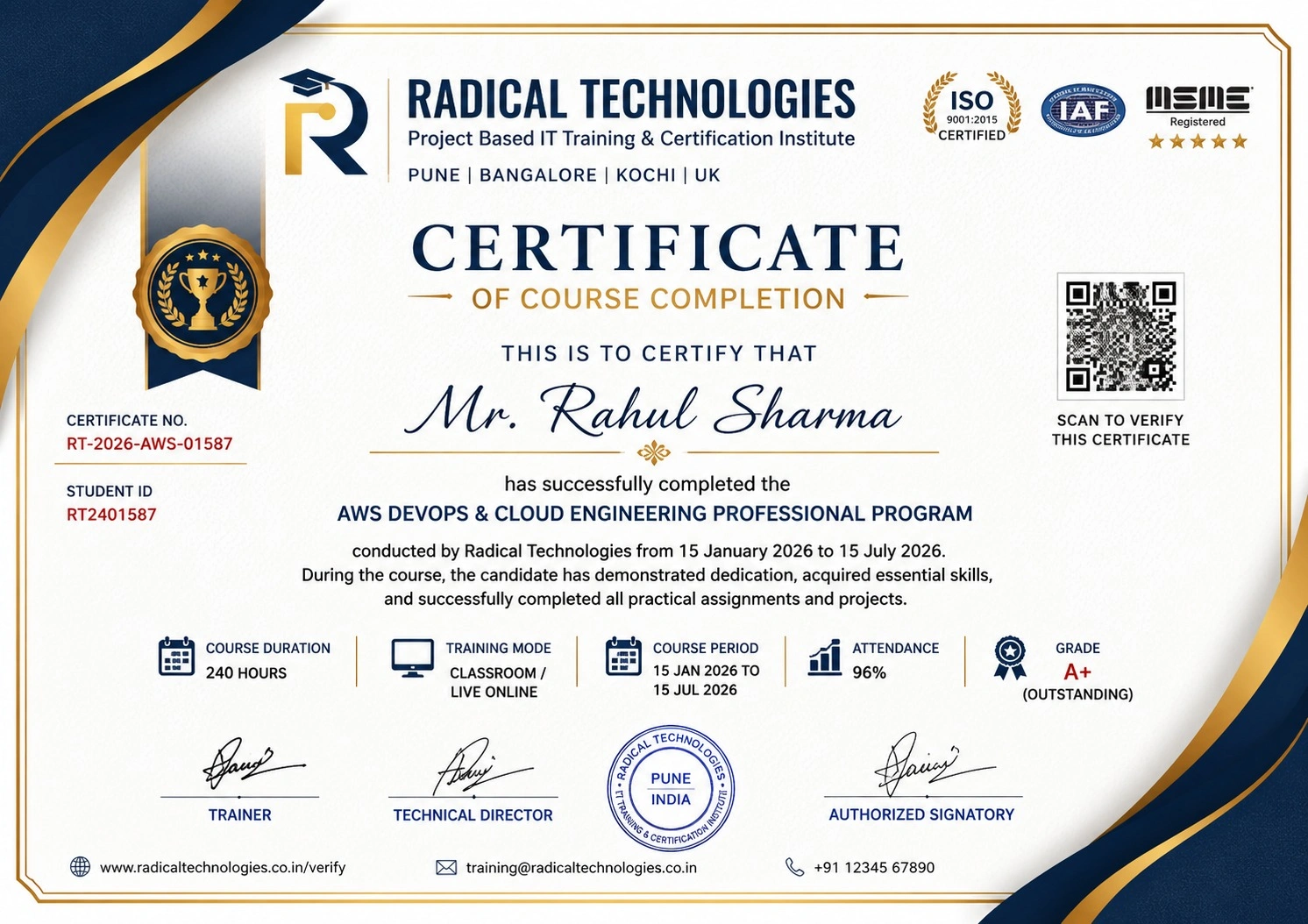
Radical Technologies is the leading IT certification institute in Pune, offering globally recognized certifications across various domains. With expert trainers and comprehensive materials, we ensure students gain in-depth knowledge and hands-on experience to excel in their careers. Our certification programs are tailored to meet industry standards — this mentorship maps to the RHCSA, AWS Solutions Architect, Azure Administrator, HashiCorp Terraform Associate, Certified Kubernetes Administrator and DevOps/SRE certification tracks, empowering individuals to stay ahead in the ever-evolving platform engineering landscape.
Career Services
Our dedicated Placement Support Team works with you from day one — resume forwarding, technical interview preparation, HR interview preparation, career guidance, soft skills training, mock interviews and internship assistance, with access to 850+ Hiring Partners and placement assistance until you get hired.
Career Support
Join our Brush-up Session & get support until you find a job!
Get StartedRadical Learning Eco-System
Exam Simulator
Cloud SandBox
Hands-on Cloud Lab
Developer Coding Ground
Student Reviews
Course Rating

Our Alumni Work At





Related Courses
PG DIPLOMA — ENTERPRISE PLATFORM ENGINEERING
400-430 hrsPG DIPLOMA — ENTERPRISE PLATFORM ENGINEERING
The full-length PG Diploma — Red Hat Linux, SRE, AIOps, AWS Solution Architect, DevOps, GenAI and Multi-Cloud Kubernetes across a 9-course programme.
6 MONTH MENTORSHIP — DATA ENGINEERING
240 hrs6 MONTH MENTORSHIP — DATA ENGINEERING
The companion mentorship track — Python & SQL, Big Data, Cloud Data Engineering, Databricks, Pipelines and GenAI & Agentic AI over six months.
PG DIPLOMA — AIOPS ENGINEERING & SRE
60+ hrsPG DIPLOMA — AIOPS ENGINEERING & SRE
AI-driven monitoring, observability (Prometheus, Grafana, ELK), machine learning for IT operations and self-healing automation.
DEVOPS ENGINEERING
70 hrsDEVOPS ENGINEERING
End-to-end DevOps toolchain — Git, Jenkins, Docker, Kubernetes, Terraform and GitOps for platform teams.
Mentorship Programme In Other Cities
Online Batches Available For These Areas
Ambegaon Budruk | Aundh | Baner | Bavdhan Khurd | Bavdhan Budruk | Balewadi | Shivajinagar | Bibvewadi | Bhugaon | Bhukum | Dhankawadi | Dhanori | Dhayari | Erandwane | Fursungi | Ghorpadi | Hadapsar | Hingne Khurd | Karve Nagar | Kalas | Katraj | Khadki | Kharadi | Kondhwa | Koregaon Park | Kothrud | Lohagaon | Manjri | Markal | Mohammed Wadi | Mundhwa | Nanded | Parvati Hill | Panmala | Pashan | Pirangut | Shivane | Sus | Undri | Vishrantwadi | Vitthalwadi | Vadgaon Khurd | Vadgaon Budruk | Vadgaon Sheri | Wagholi | Wanwadi | Warje | Yerwada | Akurdi | Bhosari | Chakan | Charholi Budruk | Chikhli | Chimbali | Chinchwad | Dapodi | Dehu Road | Dighi | Dudulgaon | Hinjawadi | Kalewadi | Kasarwadi | Maan | Moshi | Phugewadi | Pimple Gurav | Pimple Nilakh | Pimple Saudagar | Pimpri | Ravet | Rahatani | Sangvi | Talawade | Tathawade | Thergaon | Wakad
6 Month Mentorship Program in Platform Engineering
From Basic to Advanced | 6 Months | 6 Specialized Tracks
Tools you'll master